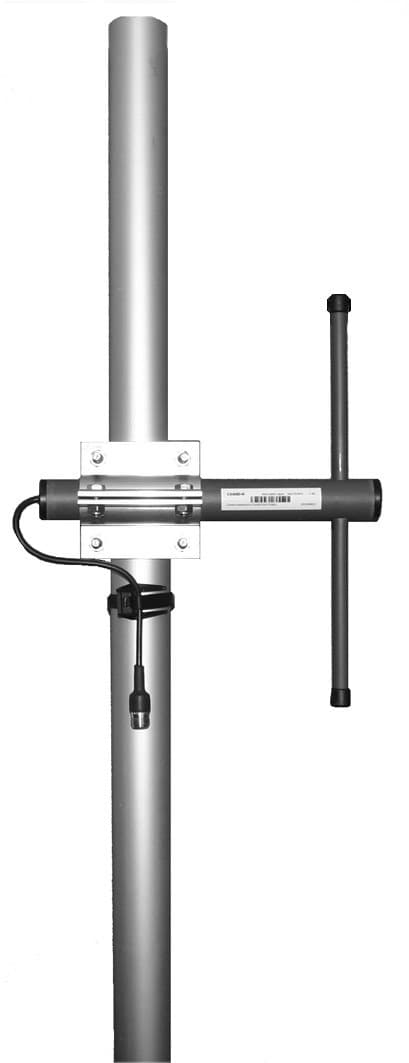
CompleTech CA170D offset pattern dipole - Frequency range: 163-177 MHz - Gain: 5 dBi - Polarization…
Documents & Media
Contact for Pricing
Call +1 (262) 252-1600 (toll-free 877-268-3700) or email [email protected] for pricing and availability.
Overview
- Frequency Range: 163-177 MHz
- Gain: 5 dBi
- Polarization: Vertical/Horizontal
- Connector Options: N-, TNC-, 7/16-female
- Durable ABS/FG Radome with PU Foam Filling
- Copper Radiator for Optimal Signal Performance
- VSWR: <1.5
- Pole Mounting: 35-60 mm diameter
- Wind Load Rating: 55 N
- IP67 Rated for Environmental Protection
Specifications
Connector | N-/TNC-/7/16-female |
Frequency | 163-177 MHz |
Gain | 5 dBi |
Length | 495 mm |
Mounting Diameter | Ø 35-60 |
Polarization | vertical/horizontal |
Radiator Material | copper |
Radome | FG, PU foam |
VSWR | <1.5 |
Weight | 860 g |
Wind Load | 55 N @ 150 km/h |
CA420D
offset pattern dipole - Frequency range: 405-440 MHz - Gain: 5 dBi - Polarization: vertical/horizontal - Connector: N-/ TNC-/ 7/16-female - VSWR: <1.5 - Radome: ABS/FG PU foam - Radiator material: copper - Mounting: 35-60 mm diameter pole - Wind load: 33 N

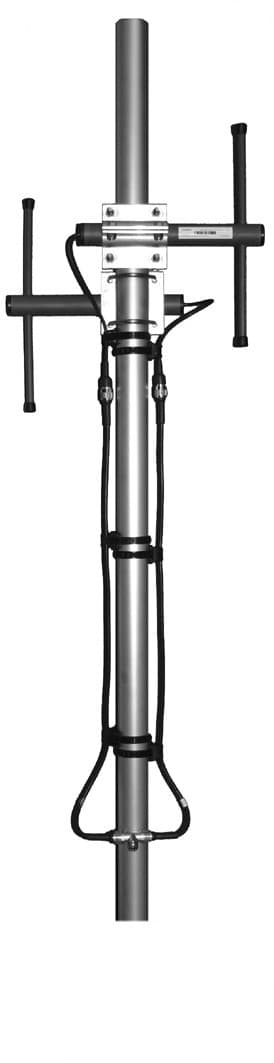
CA930B2
bidirectional broadside - Frequency range: 880-960 MHz - Gain: 6 dBi - Polarization: vertical - Connector: N-female - VSWR: <1.5 - Radome: ABS/FG PU foam - Radiator material: copper - Mounting: 35-60 mm diameter pole - Wind load: 50 N
CA170C2
offset pattern collinear - Frequency range: 163-177 MHz - Gain: 8 dBi - Polarization: vertical - Connector: N-/TNC-female - VSWR: <1.5 - Radome: ABS/FG PU foam - Radiator material: copper - Mounting: 35-60 mm diameter pole - Wind load: 110 NCA140B2
bidirectional broadside - Frequency range: 135-145 MHz - Gain: 6 dBi - Polarization: vertical - Connector: N-/TNC-female - VSWR: <1.5 - Radome: ABS/FG PU foam - Radiator material: copper - Mounting: 35-60 mm diameter pole - Wind load: 126 NCA160C2
offset pattern collinear - Frequency range: 154-166 MHz - Gain: 8 dBi - Polarization: vertical - Connector: N-/TNC-female - VSWR: <1.5 - Radome: ABS/FG PU foam - Radiator material: copper - Mounting: 35-60 mm diameter pole - Wind load: 114 N
CA860B4
bidirectional stacked broadside - Frequency range: 830-890 MHz - Gain: 9 dBi - Polarization: vertical - Connector: N-female - VSWR: <1.5 - Radome: ABS/FG PU foam - Radiator material: copper - Mounting: 35-60 mm diameter pole - Wind load: 100 NFrequently Asked Questions
What is the operating temperature range for this antenna?
The antenna can operate in temperatures ranging from -40ºC to +80ºC.
What is the impedance of the ComAnt offset pattern dipole antenna?
The impedance of the antenna is 50 ohm.
What is the gain of the CA170D antenna?
The antenna has a gain of 5 dBi.
What type of connectors are available for this antenna?
The antenna is available with N-, TNC-, or 7/16-female connectors.
What is the VSWR rating for the antenna?
The VSWR rating for the antenna is less than 1.5.
What materials are used for the antenna's radome and radiator?
The radome is made of UV resistant ABS/FG with PU foam filling, and the radiator is made of copper.
What is the IP rating of the antenna?
The antenna has an IP67 rating, indicating it is dust-tight and protected against water immersion.
How is lightning protection implemented on this antenna?
The antenna features DC-short circuited lightning protection.
What is the beamwidth of the antenna in the H and E planes?
The H -3 dB beamwidth is 179º and the E -3 dB beamwidth is 74º.
What is the front-to-back ratio (F/B) of the antenna?
The front-to-back ratio (F/B) is between 6-10 dB, depending on the mounting.
How to Install the CA170D Controller
This guide provides step-by-step instructions for installing and configuring the CA170D Controller, ensuring proper wiring and initial setup.
Estimated time: 1h
Tools needed:
Screwdriver, Wire strippers, Multimeter
Supplies needed:
Mounting screws, Terminal connectors, Self-amalgamating tape
- Mount the controller
Secure the CA170D Controller to the designated mounting surface using the provided mounting screws. Ensure it is level and firmly attached.
- Connect the wiring
Strip the ends of the wires and connect them to the appropriate terminals on the CA170D Controller. Use terminal connectors for secure connections.
- Seal the connections
Cover all connectors and cable junctions with self-amalgamating tape to protect against weather elements. Ensure no exposed wires are visible.
- Power on the controller
Connect the power supply to the CA170D Controller and turn it on. Verify that the power indicator lights up.
- Configure the settings
Access the configuration menu on the CA170D Controller and input the necessary parameters as per your application requirements.
- Calibrate the controller
Follow the calibration procedure outlined in the user manual to ensure the CA170D Controller operates accurately within specified parameters.