
Contact for Pricing
Call +1 (262) 252-1600 (toll-free 877-268-3700) or email [email protected] for pricing and availability.
Overview
- Enables safe electrical inspections without panel removal, reducing arc flash risk.
- Durable aluminum housing with broadband crystal optic for clear thermal imaging.
- IP66/IP67 rated for superior protection against water and dust ingress.
- Arc flash tested to 50kA for 1 second at 11kV for enhanced safety.
- Includes HYDROGARD™ lens moisture protection for indoor/outdoor use.
Specifications
Package Dimensions (L x W x H) | 4.84 IN x 3.66 IN x 0.85 IN |
Package Dimensions (L x W x H) | 12.2936 cm x 9.2964 cm x 2.159 cm |
Package Weight (Imperial) | 1.300 L |
Package Weight (Metric) | 0.590 kg |

SC100RR
One-Gang Low-Voltage Old Work Bracket, Length 4.32 Inches, Width 2.52 Inches, Depth 1.66 Inches, Color Orange, Material Non-Metallic


THP100
The THP100 is a padlocking, snap-on handle lock, designed for THQL breakers. The padlock is not included.
SBS
Adjustable far-side box stabilizer for electrical boxes. It clips on electrical boxes for additional support and is made of spring steel. The trade size is for 2-1/2" thru 4" metal studs, and the color is black.

H8064HLL
8x6x4 Polycarbonate Enclosure NEMA 4X | Hinged Cover | Gray | Stainless Steel Locking Latch | Mounting Feet

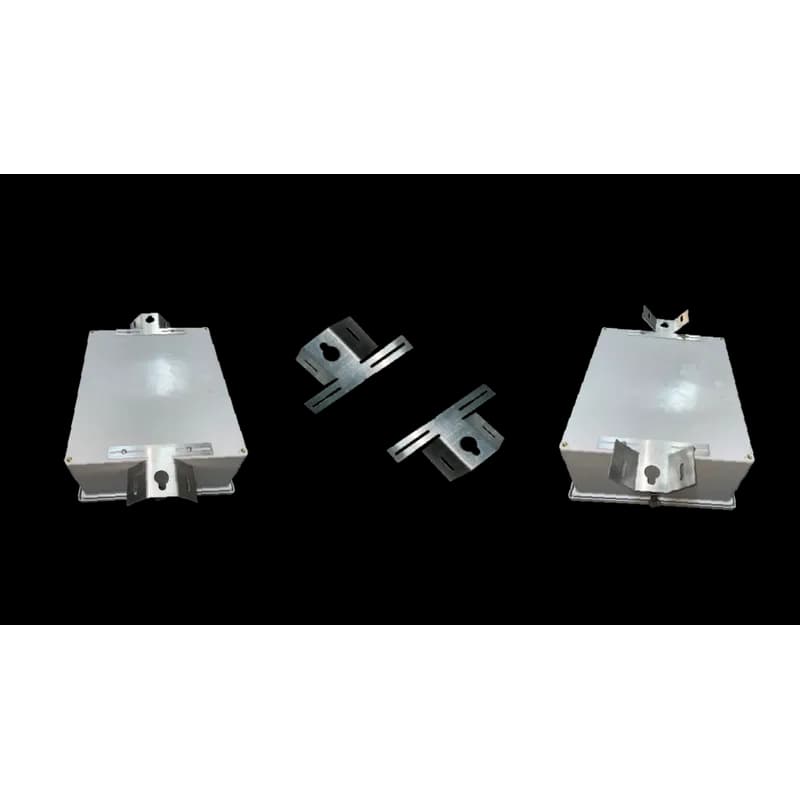
STBRK
Enclosure mounting bracket kits are specifically designed for flat surface and pole mounting. One kit includes two brackets as well as the hardware to securely fasten the brackets to a wide variety of enclosures allowing for a wide range of mounting options. Kit Details: Material: 1/8? Aluminum Bracket: (2) brackets each featuring a 6? flat bar section with (2) 3/8? holes to mount to a variety of H-bars to any pole or flat surface Fasteners: (4) 1/4? x 20 washers and (4) 1/4? x 20 carriage bolts (4) 1/4? x 20 nuts
How to Install the IW4000 Infrared Window
Guide for installing the IW4000 Infrared Window onto a flat surface of a type 4/12 enclosure.
Estimated time: 45m
Tools needed:
Hydraulic punch or hole saw (73 mm - 74 mm), Drill, Conedrill, Pozidrive screwdriver, Center punch, 6 mm (1/4 in.) drill bit, 3.6 mm (9/64 in.) drill bit
Supplies needed:
Fixing screws (4), Drilling template
- Prepare the mounting surface
Peel off the back of the drilling template and stick it to the desired flat surface of the enclosure, using the template reference points to confirm position.
- Mark fixing holes
Using the center punch, mark the fixing holes and the center hole as indicated by the template.
- Drill center hole
Using the 6 mm (1/4 in.) twist drill bit, drill out the center hole.
- Drill fixing holes
Using the 3.6 mm (9/64 in.) twist drill bit, drill out the fixing holes.
- Enlarge center hole
If using a hole saw, use the previously drilled 6 mm (1/4 in.) hole as a guide to enlarge the center hole. If using a hydraulic hole punch, refer to its manual and follow safety procedures. De-burr all holes and treat as required.
- Prepare and mount the window
Degrease the front panel. Align the fixing holes of the Infrared Window and firmly press it into place. Secure the window to the panel using three of the four supplied countersunk screws. Gradually advance each fixing screw until a torque setting between 0.5 – 1 lbf.ft (0.68 – 1.36 N.m) is achieved, ensuring the unit is secure.
- Final check
Ensure the viewport cover is secured in place to maintain the enclosure type rating.
Frequently Asked Questions about nVent
What industries and applications are nVent products used for?
nVent products are engineered for critical infrastructure and industrial applications across multiple demanding sectors. Key markets include Construction, Data Centers, Defense, Healthcare, Mining, Oil & Gas Refineries, Power Plants, Rail/Transit, Renewable Energy, Security, Ship Building, Steel Mills, Telecom, and Utilities. Their solutions are designed to withstand extreme environmental conditions, with temperature ranges from -55°C to 105°C and specialized features like UV resistance, oil resistance, and flame resistance.
What environmental ratings do nVent products have?
nVent enclosures feature comprehensive environmental ratings, including UL 508A, CSA, and NEMA Type 1, 2, 3, 4, 4X, 12, and 13 certifications. They are rated IEC 60529 IP66, providing robust protection against dust, water, and corrosion in both indoor and outdoor environments. These products operate effectively in temperatures ranging from -40°F to 266°F, with enhanced UV inhibitors for outdoor weathering and oil-resistant gaskets for superior sealing.
What accessories are available for nVent products?
nVent offers a comprehensive range of accessories across multiple product lines, including EMC accessories like bonding cable clamps and strain reliefs, inline accessories such as lock inserts and mounting brackets, CONCEPT accessories including panel conversion kits and rack-mount angles, and seismic accessories for specialized mounting requirements. Key accessory categories include grounding kits, DIN rail mounting solutions, panel supports, handles, and various mounting hardware compatible with different enclosure types.
What certifications and standards do nVent products comply with?
nVent products meet critical international certifications including UL (United States), CSA (Canada), CE (European Community), and EAC (Russia). Our products are designed to comply with rigorous industrial standards such as NEMA enclosure ratings, IEC 60529 IP ratings, and international safety standards across multiple industrial markets including oil & gas, power, manufacturing, and infrastructure.
What is nVent's warranty policy?
nVent offers a standard 18-month warranty from invoicing date for most automation products, covering defects in workmanship and materials. The warranty requires proper transportation, handling, storage, and installation within specified environmental conditions. Warranty coverage includes repair or replacement at nVent's discretion, with certain conditions such as authorized service repairs and operation within designed capacity limits.
What technical support does nVent offer?
nVent offers comprehensive technical support through multiple global contact centers across North America, South America, Europe, Middle East, India, and Asia. Customers can reach technical experts by phone at regional numbers, with the North American headquarters in Minneapolis, MN providing primary support at +1.763.421.2240. Additionally, nVent provides online support resources through their website, including CAD drawing downloads and an 'Ask The Expert' feature to assist with product technical inquiries.