
Patton Electronics SN4141/2JS2V/EUI SmartNode VoIP Gateway, 2FXS, 2 VoIP Calls, or 4 SIP-SIP calls (SIP b2b UA) upgradeable…
UPC: 847840012752
Documents & Media
Contact for Pricing
Call +1 (262) 252-1600 (toll-free 877-268-3700) or email [email protected] for pricing and availability.
Overview
- Integrates analog phones and fax machines into IP networks
- 2 FXS ports for direct connection of analog devices
- Supports 2 concurrent VoIP calls or 4 SIP-to-SIP calls
- 1 Gigabit Ethernet port for high-speed network connectivity
- External power supply: 100-240 VAC
Specifications
Package Weight (Imperial) | 3.05 lbs |


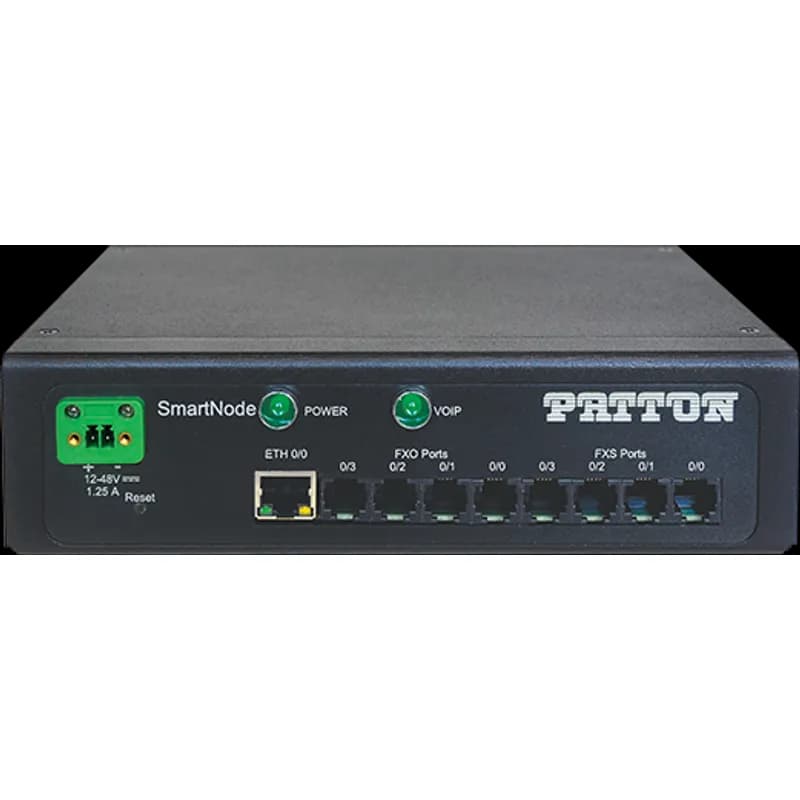
SN4141E/2ETH2JS2JO4V/DC
SmartNode Industrial VoIP Gateway, 2 FXS, 2 FXO, 4 VoIP Calls, eSBC upgradeable (SIP b2b UA max. 200 SIP calls), Optional SIP-TLS/SRTP; Transcoding (max. 4 calls), 2x Gig Ethernet, Power - Internal +12 to +48 VDC


SN4141/4JO4V/EUI
SmartNode VoIP Gateway, 4 FXO, 4 VoIP calls or 4 SIP-SIP Calls (SIP b2b UA) upgradeable (max. 200), Optional SIP-TLS/SRTP; Transcoding (max. 4 calls), 1x Gig Ethernet, external UI power (100240 VAC) NA/EUFrequently Asked Questions
What is the purpose of the Patton Trinity WEB Wizard?
The WEB Wizard is a tool to reduce installation time and simplify configuration efforts for Patton devices running the Trinity Operating System.
How can I access the WEB Wizard on a Trinity device?
You can access the WEB Wizard from the 'Wizard Menu' or by clicking the magic wand icon in the top right corner of the Trinity GUI.
What happens after I configure settings in a WEB Wizard?
After setting parameters, you can preview the generated CLI config or apply it by hitting 'Save & Reboot', which will reboot the device.
How do I add new WEB Wizard files to a device?
New Wizard files, which are XML files, can be imported under the System Menu by clicking the '+' button and selecting the .xml file.
What are the main sections of a WEB Wizard XML file?
A Wizard XML file consists of three sections: the WEB Wizard GUI elements description, the config-snippet for conditional variables, and the config for the system configuration file.
What is the WebWizard Community Platform?
The WebWizard Platform allows users to download and execute Wizards, and creators to upload and share their custom configurations for Patton devices.
Is there a cost to use the WebWizard Community Platform?
No, the usage of the WebWizard Community Platform is free of charge for both users and creators.
What is the purpose of the 'gui' element in a Wizard XML file?
The 'gui' element wraps the form definition for the user, defining the visible information and interface elements the user will interact with.
What are common attributes for UI elements in WEB Wizards?
Common attributes include 'name' for internal variables, 'label' for display text, 'tip' for hover text, 'show-if' for conditional visibility, and 'product' for device specificity.
How can I restrict access to a WEB Wizard?
Access can be restricted using the 'privilege-level' attribute in the 'gui' element, with values like 'web-admin' or 'web-wizard-exec'.
Frequently Asked Questions about Patton Electronics
What is Patton Electronics's warranty policy?
Patton Electronics offers a comprehensive 30-day money-back guarantee on all standard products. This allows customers to purchase with complete confidence, and if unsatisfied, return the product within 30 days. Additionally, Patton provides free top-notch technical support and offers extended warranty options for customers seeking additional protection.
What industries and applications are Patton Electronics products used for?
Patton Electronics products serve multiple critical industries including telecommunications, enterprise networking, industrial automation, banking, point-of-sale, and machine-to-machine communications. Their product lines like SmartNode VoIP, IPLink Routers, and Remote Access Servers enable connectivity solutions for ISP internet access, corporate VPN networks, remote industrial communications, secure banking transactions, and diverse network environments.
What technical support does Patton Electronics offer?
Patton Electronics offers comprehensive technical support through multiple channels, including free top-notch phone and online support directly from factory personnel. Customers receive immediate assistance via phone (+1.301.975.1007 in USA, +41.31.985.25.55 in Switzerland) or email ([email protected]). Their technical support includes free technical advice, installation assistance, advanced service level agreements (SLAs), extended warranty options, advance replacements, and on-site training services.
What are the main product lines offered by Patton Electronics?
Patton Electronics offers a comprehensive range of networking and communication products across multiple product lines, including VoIP Telephony, IP WAN Routers, DSL Products, Remote Access Servers, Serial Device Servers, Industrial Computers, Interface Converters, and Network Connectivity Solutions. Their key product categories span telecommunications infrastructure, network access technologies, and industrial communication equipment, with a strong focus on integrated voice/data routers, broadband connectivity, and network access solutions.
What are the key features of Patton Electronics products?
Patton Electronics offers a comprehensive range of industrial networking and communication products with key features including VoIP telephony, network access solutions, device servers, and Ethernet extension technologies. Their product lines feature robust software, industry-standard protocols (H.323, SIP, MGCP), and versatile interface options for voice and data networks. Standout capabilities include low-cost broadband routers, remote access servers with legacy modem compatibility, and Ethernet extenders that can operate over standard twisted pair cables with ranges up to 5 miles.
What communication protocols do Patton Electronics products support?
Patton Electronics products support multiple communication protocols across serial and Ethernet networks, including RS-232, RS-422, RS-485, Ethernet 10/100BaseTX, 802.11b WiFi, Bluetooth, IPv4, TCP/UDP, Telnet, DHCP, and NAT. Their device servers and networking solutions enable seamless communication between serial devices and Ethernet networks, with support for various data formats, parity options, and transmission speeds.
What environmental ratings do Patton Electronics products have?
Patton Electronics offers three primary environmental ratings through their EnviroNET product lines: EH Series (NEMA 4, 32-122°F), EC Series (32-185°F with environmental protection), and ET Series (Extended Temperature, -40 to 185°F with robust environmental resistance). These series protect against dust, rain, snow, moisture, and physical tampering, making them suitable for harsh industrial environments.
What accessories are available for Patton Electronics products?
Patton Electronics offers a wide range of accessories including power supplies, interface converters, surge protectors, baluns, line drivers, fiber modems, serial device servers, Ethernet extenders, and rack mounting solutions. Key accessories include universal AC/DC power supplies, rack chassis, interface cards, and connectivity adapters for various network and communication applications.
What certifications and standards do Patton Electronics products comply with?
Patton Electronics products are certified to ISO 9001 quality management standards and comply with key international certifications including UL (Underwriters Laboratories) for the USA and Canada. The company maintains a rigorous quality assurance system at their Gaithersburg, Maryland facility, ensuring their industrial networking, communications, and automation products meet high standards of performance and reliability.
How are Patton Electronics products typically installed?
Patton Electronics offers comprehensive installation support through their Global Solutions Group, which provides system engineering, installation, operations, and maintenance services for voice, data, and integrated networks. Their technical support team can assist with installation, and they offer extensive online resources including user manuals and technical notes at www.patton.com to facilitate product setup. For complex installations, Patton leverages a network of local personnel and integration contractors worldwide to ensure professional implementation.