Contact for Pricing
Overview
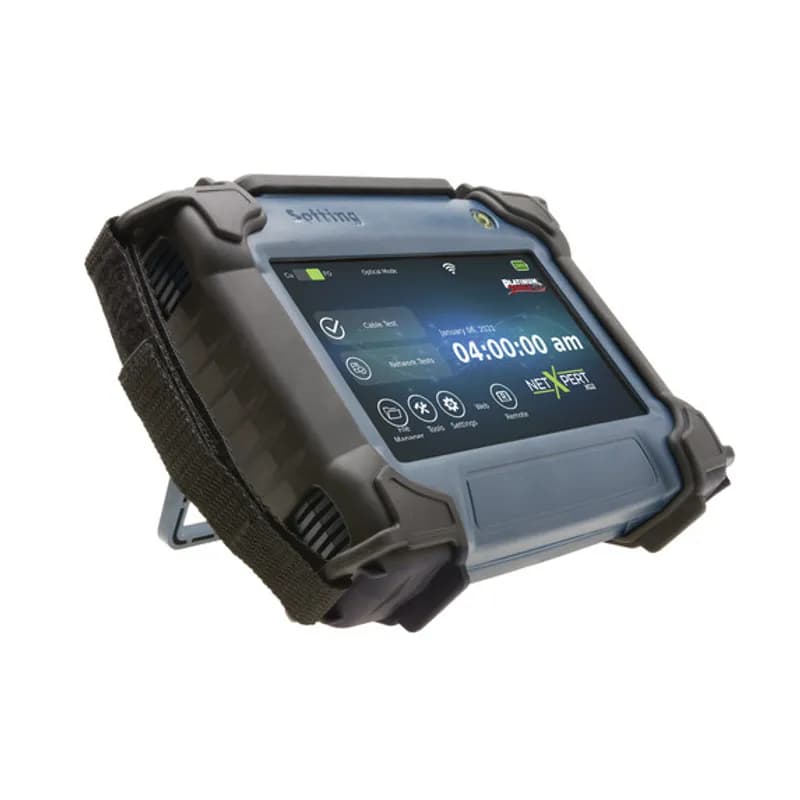
- Certifies copper and fiber networks to 10G speeds using Bit Error Rate Testing (BERT).
- Performs real-world testing by pushing actual data packets over the cable.
- Includes a full suite of active network tests and tools for faster installs.
- Features PoE testing to verify power delivery to network devices.
- Enables network testing over WiFi for added diagnostic flexibility.
How to Install the TXG200 Controller
This guide provides step-by-step instructions for installing and configuring the TXG200 Controller for network cabling tests.
Estimated time: 45m
Tools needed:
Screwdriver, Wire strippers, Multimeter
Supplies needed:
Mounting screws, Terminal connectors
- Mount the controller
Secure the TXG200 controller to a suitable mounting surface using the provided mounting screws. Ensure it is level and firmly attached.
- Connect power supply
Plug the power supply into the controller's charging jack and connect it to a power source. Ensure the device is charging by checking the status LED.
- Register the device
Visit the registration website at platinumtools.com/XG2 and enter the serial number found on the back of the device. Complete the registration to receive updates and support.
- Set up initial configuration
Power on the TXG200 by pressing the power button. Tap the Settings icon on the touch screen to set the language, date, and time.
- Select cable type
In the Cable Test menu, tap the Cable Type icon to select the appropriate cable type for testing. This is crucial for accurate test results.
- Perform a cable test
Navigate to the Cable Test screen and tap the Test button to initiate a cable test. Follow the on-screen prompts to complete the test.
Frequently Asked Questions about NSI Industries
How are Tork products typically installed?
Tork products are typically installed by trained technicians who follow a comprehensive commissioning process. This includes verifying the work environment, conducting electrical installation checks, performing internal and external equipment inspections, powering on the system, and executing operational tests to ensure compatibility and reliability.
What environmental ratings do Tork products have?
Tork products are designed to meet various environmental ratings, including NEMA Type 4X and Type 6, which provide protection against corrosion, windblown dust, rain, and occasional temporary submersion. These ratings ensure that Tork products can withstand harsh industrial environments while maintaining operational integrity.
What communication protocols do Tork products support?
Tork products support a comprehensive range of communication protocols, including PROFIBUS DP V1, PROFINET with dual port, EtherNet/IP with dual port, CANopen, and Modbus RTU integrated as standard. These protocols facilitate flexible network integration and high-performance communication across various industrial automation systems.
What are the key features of Tork products?
Tork products are designed with advanced features that enhance efficiency and reliability in industrial applications. Key features include integrated harmonics and EMC design for improved power quality, removable terminals for quick installation, and USB ports for easy troubleshooting. Additionally, Tork solutions emphasize user-friendly setup with application wizards and memory modules for convenient parameter management.
What are the main product lines offered by Tork?
Tork offers a diverse range of products primarily focused on industrial automation, including TORK® Photocontrols, lighting controls, and various electrical components such as enclosures, occupancy sensors, and grounding solutions. These products are designed to enhance efficiency and reliability in commercial and industrial applications.
What technical support does Tork offer?
Tork offers a comprehensive range of technical support services, including 24/7 customer support, on-site service management, and a technical hotline network. With three advanced technical support centers and over 8,000 hours of technical training conducted annually, Tork ensures certified expertise across 25+ languages to assist customers effectively. Their commitment to service is reflected in a 98% Service Level Agreement compliance rate, providing reliable support for all operational needs.
What industries and applications are Tork products used for?
Tork products are utilized across a variety of industries, including food processing, healthcare, hospitality, and manufacturing. They are designed for applications such as hand hygiene, surface cleaning, and dispensing solutions, ensuring efficiency and compliance in environments that require high standards of cleanliness and safety.
What certifications and standards do Tork products comply with?
Tork products comply with UL and cUL certifications, ensuring they meet rigorous safety and performance standards. Additionally, many models are designed to meet NEMA enclosure ratings, providing protection against environmental factors.
How are Remke products typically installed?
Remke products are typically installed through a systematic process that includes site audits to verify proper wiring, followed by remote or on-site commissioning. This commissioning involves installation verification, programming, and communication testing to ensure the system operates reliably and meets design specifications.
What accessories are available for Remke products?
Remke offers a wide range of accessories for their products, including panel mounting kits, fuse holders for voltage inputs, ferrites for communication modules, and current transformers. These accessories enhance the functionality and protection of Remke's industrial automation solutions, ensuring reliable performance in various applications.